The short version
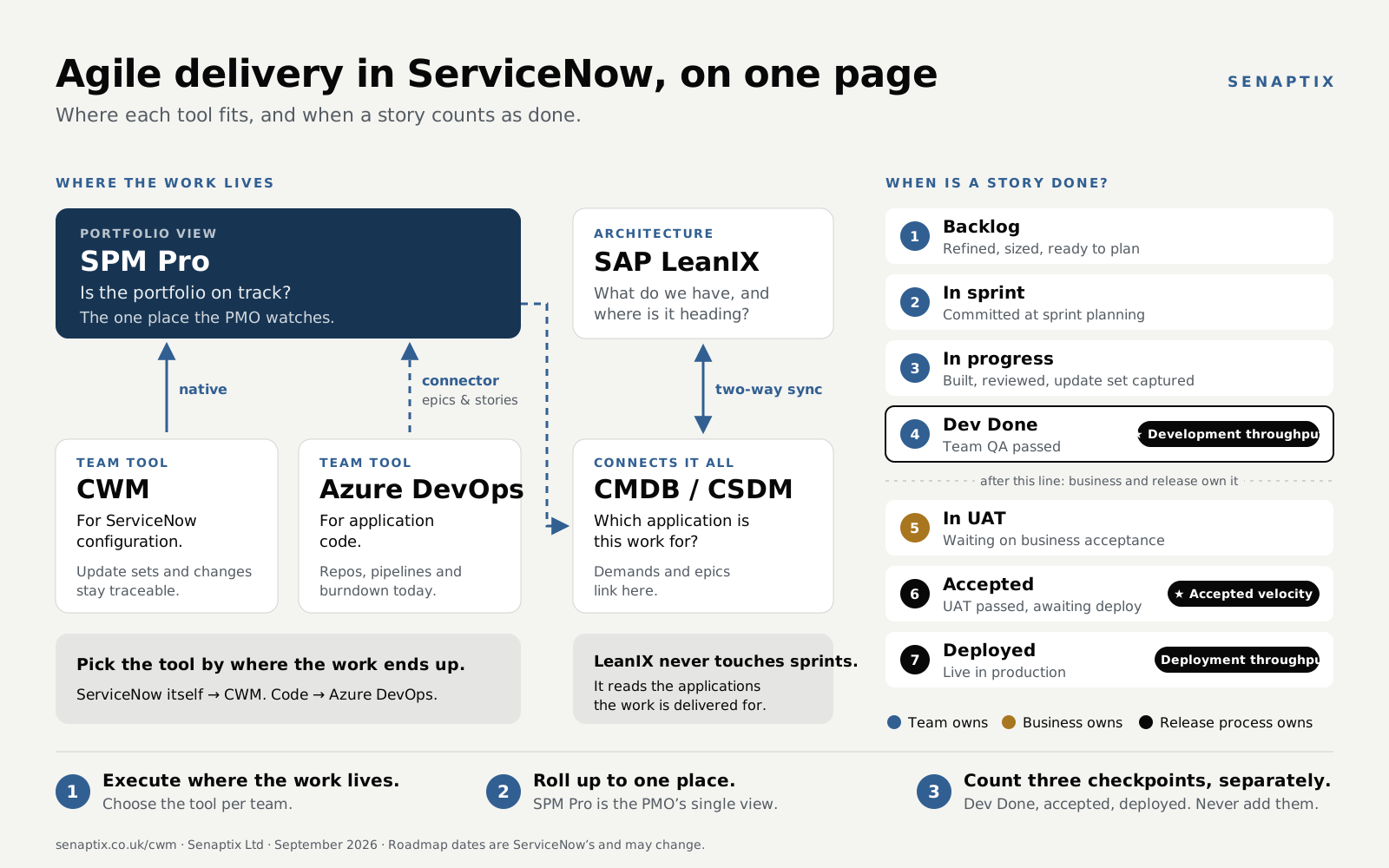
- CWM can run sprints as well as Jira does, but only once deployment stops defining “done”. Count development at Dev Done, and acceptance and deployment as separate numbers. If your Definition of Done includes UAT, only accepted points are velocity.
- Keep the story ↔ update set and story ↔ change links for traceability. Just don’t make a story wait for its change before it can close, and split stories by the solution, not by the calendar.
- A story waiting in UAT shouldn’t fill next sprint’s capacity. Close each sprint on time, move unfinished work to the backlog, re-estimate what’s really left, and manage UAT as its own queue.34
- CWM now has native velocity, burndown and burnup charts, in CWM Advanced 2.2.1 (September 2026). Check your version, and what the charts count as complete, before building your own.33
- Don’t ask “ADO or CWM?”. Ask where each team’s work lives. ServiceNow configuration goes in CWM. Application code goes in ADO. Both roll up to SPM Pro.
- The out-of-the-box ADO connector feeds Agile Development 2.0 (the
rm_*tables), not CWM. It covers epics and stories. Sprints and bugs don’t sync cleanly, and direct ADO ↔ EAP integration is postponed to Q4 2026.1820 - LeanIX sits above delivery, not inside it. It syncs business applications with the CMDB. Delivery links to those applications through CSDM. Decide which system owns the application portfolio.
Why CWM sprints look like they’re failing
Teams move from Jira or Agile Development 2.0 to CWM and, within a sprint or two, decide it “can’t do agile”. Velocity reads a fraction of what was planned and stories sit on the board for weeks. Leadership sees a team missing commitments while it is actually shipping a lot of work.
The tool is rarely the root cause. If several of these are true, you have a coupling problem, not a CWM problem:
- Points only count at final closure. A story that is 95% built contributes nothing until it is fully closed.
- Done is tied to deployment. Stories only close when the release or change completes.
- Work spans many sprints. Items stay open for five weeks or more, waiting in UAT or for a deployment window rather than in development.
- Business delay is invisible. Reporting can’t separate a development delay from a business one, so the team takes the blame for both.
- Old stories fill new sprints. Every open story rolls into the next sprint, so capacity looks full of work that needs no development.
- Large items aren’t split. Big initiatives run as single oversized stories, not epics with sprint-sized stories sliced by the solution.
It’s two problems, not one. Sprint planning goes wrong because old stories keep taking capacity, and reporting goes wrong because it can’t tell development progress from business acceptance and deployment. Changing how velocity is calculated fixes only the second.
What other ServiceNow teams report
These are practitioner discussions in the ServiceNow Community, not generic agile advice. There’s no single method most CWM teams use yet. What they show is the same problems recurring.17
- How to track the sprint history (September 2026). A story developed in Sprint 1 is validated and deployed in Sprint 2. The team wants to count the sprints a story was in and spot stories added mid-sprint. Today they export the story list at the start and end of each sprint. The reply suggests metric definitions on the story and sprint tables.37
- Managing after sprint is complete in CWM (September 2026). Stories stay on their original sprint, linked to a change or release. The CWM sprint doesn’t show on the classic story form, because CWM keeps it in its own tables.38
- Carryover stories and points to next sprint (October 2024). A team built a carryover table for copied and split stories. Developers got round it by closing the story and opening a new one with slightly different wording, so the carryover disappeared. Recreating stories to tidy up reporting hides the problem.39
- Start date / end date functionality in CWM board (July 2026). Adding the same story to two CWM boards creates two separate CWM records, each with its own dates.43
- A lean (mean) ServiceNow release process (2013, by a ServiceNow employee). ServiceNow’s own developers had finished work waiting weeks for release and an overloaded UAT stage. It predates CWM, but it’s the same bottleneck. More in Managing the UAT queue.40
How CWM maps to Jira
CWM gives each team a space with List, Kanban and Sprint Planning views, plus a backlog, story points, capacity, docs and automations.3 It replaces Agile Development 2.0 and shares the same Story table, so existing stories and epics appear through Connected Work without a migration.14
| Jira | CWM | Notes |
|---|---|---|
| Board | Space: List / Kanban / Sprint Planning | One space per team. |
| Epic | Epic | Anything longer than a sprint. |
| Story | Story | Shared Story table with Agile 2.0. |
| Sub-task | Scrum task | On boards from the March 2026 release. |
| Backlog | Backlog via Connected Work filters | Replaces Agile 2.0’s Unified Backlog. |
| Sprint, points, capacity | Sprint, points, capacity | Set in the Sprint Planning view. |
| JQL | Condition builder / encoded queries | Same idea, different syntax. |
| Confluence | Collaborative Docs | Good for planning notes and retros. |
| Automation | CWM automations / Flow Designer | Reminders, transitions. |
| Sprint reports | Native charts (CWM Advanced) / Platform Analytics | Native velocity, burndown and burnup from CWM Advanced 2.2.1 (September 2026), plus board dashboards.3344 See Reporting in CWM. |
Separate delivery, acceptance and deployment
This is the core of the guide. “Closed story points” is being asked to mean three different things at once. Split them, each with its own metric and owner:
| Axis | Question | Metric | Owner |
|---|---|---|---|
| Sprint delivery | Did the team finish what it controls? | Points reaching Development Done | Team |
| Flow | How long from dev-done to live, and where is the wait? | Cycle time, time in UAT, time ready to deploy | Business + release |
| Deployment | Is it in production? | Change / release status | Change & release |
Two-tier Definition of Done
- Development Done (sprint DoD). Code complete and peer-reviewed, update set captured, documentation done, team QA passed. Development throughput is credited here. If your Definition of Done stops here, it’s also your velocity.6
- Done-Done (release DoD). UAT passed, change approved, deployed, business-accepted. Tracked on the flow axis. It doesn’t gate development throughput.
On Scrum orthodoxy
Strict Scrum says done means potentially shippable.7 In a regulated enterprise, where change control and UAT sit outside the team’s control, a two-tier DoD is a common, pragmatic adaptation. Be explicit that Development Done is a delivery checkpoint. Value is realised at Done-Done.Name the three numbers
The Scrum Guide says work isn’t part of an Increment until it meets the Definition of Done.29 So the key question is whether your DoD needs business UAT. If team QA is enough, points at Dev Done are velocity. If UAT is required, points at Dev Done are development throughput, and velocity comes at acceptance. Production deployment doesn’t have to line up with the sprint end either way.
| Measure | Counted when | Use it for |
|---|---|---|
| Development throughput | A story reaches Dev Done | What the team built; planning development capacity |
| Accepted velocity | A story meets the full Definition of Done, including UAT where required. Original points, counted once | Completed product scope; forecasting |
| Deployment throughput | Accepted stories reach production | What users actually have |
Don’t add them up
The three measures are different checkpoints for the same work. Never add them together, and don’t call all three “velocity”.Stories, update sets and changes
Why the story matters so much on a platform team
On a ServiceNow platform team the story is a unit of change as well as a planning item. Developers put the story number at the start of each update set, e.g. STRY0012345 – short description. When they prepare a deployment, they filter on that number and see everything that belongs to that piece of work. So changing how stories are structured also changes how the team deploys, which is why proposals to split stories often meet resistance.
The disagreement
When velocity looks low, two positions usually come up. Both have a point.
| Split stories smaller | Keep stories whole, fix the reporting | |
|---|---|---|
| The case | Stories that finish inside a sprint give steadier velocity, earlier feedback and a truthful burndown. | The story is the unit of change. Splitting it for reporting adds update sets, admin and deployment tracking, and the work itself hasn’t changed. |
| Where it’s right | It’s the standard guidance: an item is ready for a sprint when the team can get it to Done within that sprint.2930 | Splitting by the calendar (“part 1 this sprint, part 2 next”) or by technical layer is an anti-pattern.31 The update-set overhead is a real cost. |
| Where it goes wrong | Splitting by the calendar only to raise the number of closed stories is progress on paper, not in the product. | Some stories are large because they do too much, not because they’re waiting. Keeping them whole hides that. And counting a story as partly done contradicts Scrum.14 |
What best practice says
- Stories should fit in a sprint. The Scrum Guide says items that can be Done within one sprint are ready for selection, and INVEST’s “Small” means small enough to fit an iteration.2930 A story that needs several sprints of development should be split.
- Split vertically, never by the calendar or by layer. Each story should deliver something that works and can be tested. An integration, for example, can have one story per table or class being integrated, under an epic. Avoid “build it this sprint, finish it next sprint” and “one story for the UI, one for the script”.31
- Don’t split work that’s only waiting. If development finished in one sprint and the story then sat in UAT, splitting it won’t help. Count development throughput at Dev Done instead (see section 6).
- No partial credit. A story that is 95% built counts nothing until it reaches Dev Done.1214 Recording points when a story moves to UAT is fine, but only if reaching UAT means it has met the sprint Definition of Done.
Handling the update-set cost
Smaller stories do mean more update sets. The platform lets you keep deployment manageable without keeping stories large:
- Batch update sets under a parent. Give each story’s update set a parent. Committing the base update set commits the whole batch.32 One parent per epic or release keeps a deployment to one commit.
- Prepare deployments by epic or release. Filter on the epic or release to see everything that ships together. Story numbers still trace each individual change.
- Keep the naming convention. Story number first on each update set, epic or release number on the parent.
The recommendation
Split stories by the solution so each can reach Dev Done within a sprint. Don’t split by the calendar or only to lift the burndown. Count velocity at Dev Done, batch update sets by epic or release, and keep the story-number convention.Story ↔ update set: keep it
ServiceNow practitioners document the same practice: one update set per story, with a naming pattern built from project, release, sprint and story, and only approved stories selected for a release.4142
The story-number convention traces planned work to the exact configuration. It isn’t what hurts velocity, so don’t change it to fix a reporting problem.
Story ↔ change: link, but don’t gate
Nothing in ServiceNow requires a story to stay open until its change is implemented. That’s a local process choice, and it causes zero-velocity sprints. ServiceNow’s own DevOps Change Velocity creates changes from the pipeline, enriches them with stories and commits, and closes them on deployment.89 The change trails the delivery, and ServiceNow treats traceability as a separate stage.10
Design rule
Link stories to update sets and changes. Credit development at Dev Done. Never let “change not yet deployed” hold a delivered story open, and never split a story by the calendar just to improve the burndown.Closing sprints and carryover
CWM doesn’t need a story to stay in its original sprint, or in every sprint after it. ServiceNow’s documented close is: select Complete Sprint, review the completed and open items, move incomplete items to the next sprint or the backlog, optionally create a retrospective board, then complete it.34 The backlog then shows all unplanned work, including older incomplete items.5 So you need to tell work that needs development apart from work that is only waiting.
Why carrying everything forward distorts capacity
A hypothetical team plans 40 points a sprint. At the end of Sprint 74 it has handed three stories (24 points) to UAT, and none is accepted yet. Another 16 points are genuinely unfinished.
| Sprint 75 | Carry everything forward | Replan at sprint close |
|---|---|---|
| Awaiting UAT | 24 pts | 0 pts (in the UAT queue instead) |
| Unfinished development | 16 pts | Re-estimated: maybe only 6 pts left |
| New work | 24 pts | 24 pts, or more if the re-estimate frees room |
| Sprint load | 64 pts against 40 capacity | 40 pts of real development |
The UAT stories need no development in Sprint 75, so counting them again overstates the workload. That’s a planning problem, and it’s separate from when their points eventually count.
What to do with each kind of carryover
| Story at sprint end | Next action |
|---|---|
| Development unfinished | Back to the backlog. Re-estimate the remaining effort, then decide whether to pull it into the next sprint. |
| Development done, awaiting UAT | Keep the story open and visible in the UAT queue. Don’t allocate it to the next development sprint. |
| UAT failed, small fix | Plan the fix. Use a linked rework item if it needs its own sprint allocation. |
| UAT failed, requirements changed | Revisit the acceptance criteria and decide whether this is genuinely new scope. |
| Accepted, awaiting CAB | Track it through release management. It shouldn’t use development capacity. |
UAT rework without corrupting the numbers
Scrum tasks can’t carry rework into a later sprint. They inherit their parent story’s sprint, can’t be assigned to another sprint, and don’t roll percent complete up to the story.36 For rework that’s separately estimable, create a defect or CWM task linked to the original story, and keep the story number in the update-set name. A minor fix can stay on the original story.
| Story STRY-A (8 pts) | Sprint 74 | Sprint 75 | Sprint 76 |
|---|---|---|---|
| What happened | Dev Done, into UAT | UAT failed, 2 pts of fixes | UAT passed |
| Development throughput | 8 | — | — |
| Rework completed | — | 2 | — |
| Accepted velocity | — | — | 8 |
Don’t count the original 8 points again each time the story passes Dev Done. Record every return from UAT, and watch the rate: a high one can point to weak acceptance criteria, late stakeholder involvement or thin testing, but check each case. And don’t assume a story in UAT is 90% done. Rework can be large.
Two views, one set of records
- Active sprint: only work that needs the team this sprint: new development, active testing, UAT fixes.
- UAT and release queue, across all sprints: the original story, its update sets, UAT owner, days waiting and change reference.
Use the Sprint Planning view to allocate work and Kanban to track it.46 Build both views as saved filters on the same board. A second board creates a separate CWM record for the same story, with its own dates.43
Managing the UAT queue
Better velocity reporting can make the developers’ output visible while the UAT backlog keeps growing. In 2013 a ServiceNow employee described their own development team hitting exactly this: finished work waiting for release, long gaps between dev complete and production, and repeated UAT rework. They had overloaded UAT by pushing every finished item into it.40
The fix wasn’t better Scrum reporting. They ran distinct stages (dev complete, ready for UAT, in UAT, ready to deploy, done), made the queue visible, pulled work into UAT instead of pushing it, flagged blocked items and measured time in each stage.
Points developed vs points accepted, per sprint
Over five sprints, 154 points reached Dev Done and 126 were accepted. The UAT queue grew by 28 points, even though some sprints accepted more than they developed.
Show the data
| Sprint | Reached Dev Done | Accepted | UAT queue change |
|---|---|---|---|
| S71 | 28 | 24 | +4 |
| S72 | 32 | 20 | +12 |
| S73 | 26 | 28 | -2 |
| S74 | 36 | 24 | +12 |
| S75 | 32 | 30 | +2 |
Will it even out on its own?
Only if acceptance keeps pace. If UAT is simply late by a steady amount, accepted points follow development a sprint or two behind. If the team hands over work faster than the business can check it, the queue grows. Work goes stale, developers revisit it, and context switching eats capacity.
- Each sprint, compare stories entering UAT with stories leaving it, whether accepted or rejected.
- Track the age of the oldest item waiting.
- Give every UAT item an owner and an expected response date.
Reporting delay or real bottleneck?
If the queue keeps growing, a better velocity chart won’t fix delivery. Fix the acceptance bottleneck instead of hiding it in the numbers.Reporting in CWM
Check the native charts first
Sprint velocity, burndown and burnup charts arrived in CWM Advanced 2.2.1 in September 2026. Teams with EAP already had team-level sprint reporting.33 The same month added configurable dashboards on each CWM board.44 Earlier guidance said these were planned for H2 2026 and to use Performance Analytics until then, and practitioners expected Q4 2026.1211
Before building anything, confirm your installed version. We couldn’t find public documentation on which state the native velocity counts as complete, whether Dev Done can be the counting point, or how a story reopened after UAT is handled. Test those on your instance. A native burndown may fix the missing chart without fixing your definition-of-done problem.
| Option | What | When to choose it |
|---|---|---|
| A · Native CWM charts | Velocity, burndown and burnup in CWM Advanced 2.2.1+. | First choice if installed and its completion point matches your Definition of Done. |
| B · Performance Analytics | Daily snapshot of points remaining in sprint, broken down by state. | Native and upgrade-safe. Check PA licensing and schedule the collection jobs. |
| C · BI via Table / OData API | Pull stories, CWM sprints and state history into Power BI or similar. | You have BI capability and want time-in-state, say-do and cycle time. |
Don’t lean on Agile 2.0 dashboards
Agile 2.0 has mature sprint reporting: burndown, burnup and a cumulative flow diagram.4516 But ServiceNow says not to use CWM and Agile Development 2.0 at the same time for the same stories.35 So they’re not a safe reporting layer for CWM work.The data-model trap
CWM doesn’t use the old sprint data model. Flag this to developers before anyone writes a report:
| Data | Table |
|---|---|
| Story | rm_story |
| CWM sprint | sn_cwm_sprint |
| CWM work item and its sprint | sn_cwm_task |
| Scrum task | rm_scrum_task |
| Agile 2.0 sprint (legacy) | rm_sprint |
Sprint, story points and acceptance criteria set in CWM aren’t written back to the classic story form.35 The CWM sprint lives on the CWM work item, not on the story.38 A report built on rm_story.sprint can be wrong even when the board looks right.
Capture history, not just current values
When a story moves from Sprint 74 to 75, a report on current values shows only 75. You lose the original commitment and the carryover. Record events as they happen:37
| Field or event | Why |
|---|---|
| Original story ID | Permanent traceability |
| Sprint at commitment, date added, date removed | Baseline, mid-sprint scope and carryover |
| Initial story points | Original estimate |
| Dev Done timestamp | Development checkpoint |
| UAT entry timestamp, UAT return count | Waiting time and rework |
| UAT acceptance timestamp | Accepted checkpoint |
| Deployment date | Deployment checkpoint |
This is a proposed design, not an out-of-the-box CWM schema. Metric definitions can record how long a field held each value, and scripted metrics cover the rest.47 Metrics record changes as they happen, so start capturing now. For older sprints, rebuild what you can from audit history or exports, and label anything incomplete as partial. Check the field mappings on your version first.
Five reports
- Development throughput per sprint.
- Accepted completion per sprint.
- Sprint carryover.
- UAT ageing.
- Scope change during the sprint.
Add a cumulative flow diagram of stories in development, in testing and awaiting acceptance. It shows the bottleneck better than a burndown. Reuse the native charts where they fit rather than rebuilding them.
Report on state changes, not closure
Whichever option you pick, build on state transitions. Then you can say “45 points developed, 30 waiting in UAT”, however the native widget counts.CWM or Azure DevOps?
That question mixes up two separate layers: where teams execute, and where the PMO gets its portfolio view. Don’t mandate one execution tool. Mandate one roll-up point.
What the connector actually does
ServiceNow’s ADO integration syncs projects, teams, iterations and work items into Agile Development 2.0: epics, stories and sprints in the rm_* tables.19 In practice it centres on epics and stories. Bug → defect mapping is out of scope, and sprint imports are unreliable.18 The EAP route runs EAP → Agile Development → ADO, is officially interim, and can’t sync sprints. Direct ADO ↔ EAP integration is postponed to Q4 2026. Jira ↔ EAP has worked out of the box since December 2025.20
So there’s no native ADO → CWM connector. What exists is ADO → SPM, and SPM is where the PMO wants the visibility anyway.
Keep ADO-synced stories out of CWM
CWM shares the Story table with Agile 2.0, so stories synced from ADO could appear in a CWM space through Connected Work. Don’t manage them there: ServiceNow says not to use CWM and Agile Development 2.0 at the same time for the same stories.35Side by side
| Azure DevOps | ServiceNow CWM | |
|---|---|---|
| Sprint tooling | Stronger: mature boards, capacity, burndown and velocity today | Native velocity, burndown and burnup from CWM Advanced 2.2.1 (September 2026) |
| Code, repos, pipelines | Native | None |
| On-platform work (update sets, changes, catalogue, CMDB) | Can’t see it | Native |
| Roll-up to SPM Pro | Via connector: epics and stories, imperfect | Native: same platform, shared data model with EAP |
| Story ↔ update set ↔ change traceability | Broken: delivery lives outside ServiceNow | Intact |
| Licensing | Separate Microsoft spend | Included in SPM Standard and Pro21 |
The decision rule
- Teams whose deliverable is ServiceNow configuration (platform and admin teams) should use CWM. Their update sets, changes and catalogue items live on-platform. Traceability works natively and roll-up needs no connector. Starting CWM adoption with the platform team is the right instinct.
- Teams whose deliverable is application code should use ADO, which has better sprint tooling and sits next to the code. Their epics and stories reach SPM through the connector.
- Everyone rolls up to SPM Pro as the single view. Add EAP (Pro tier, replaced SAFe) if you need PI planning across teams.22
The failure mode is forcing one tool for neatness. All-CWM hobbles code teams. All-ADO loses on-platform traceability for the ServiceNow team.
Upstream: from idea to project
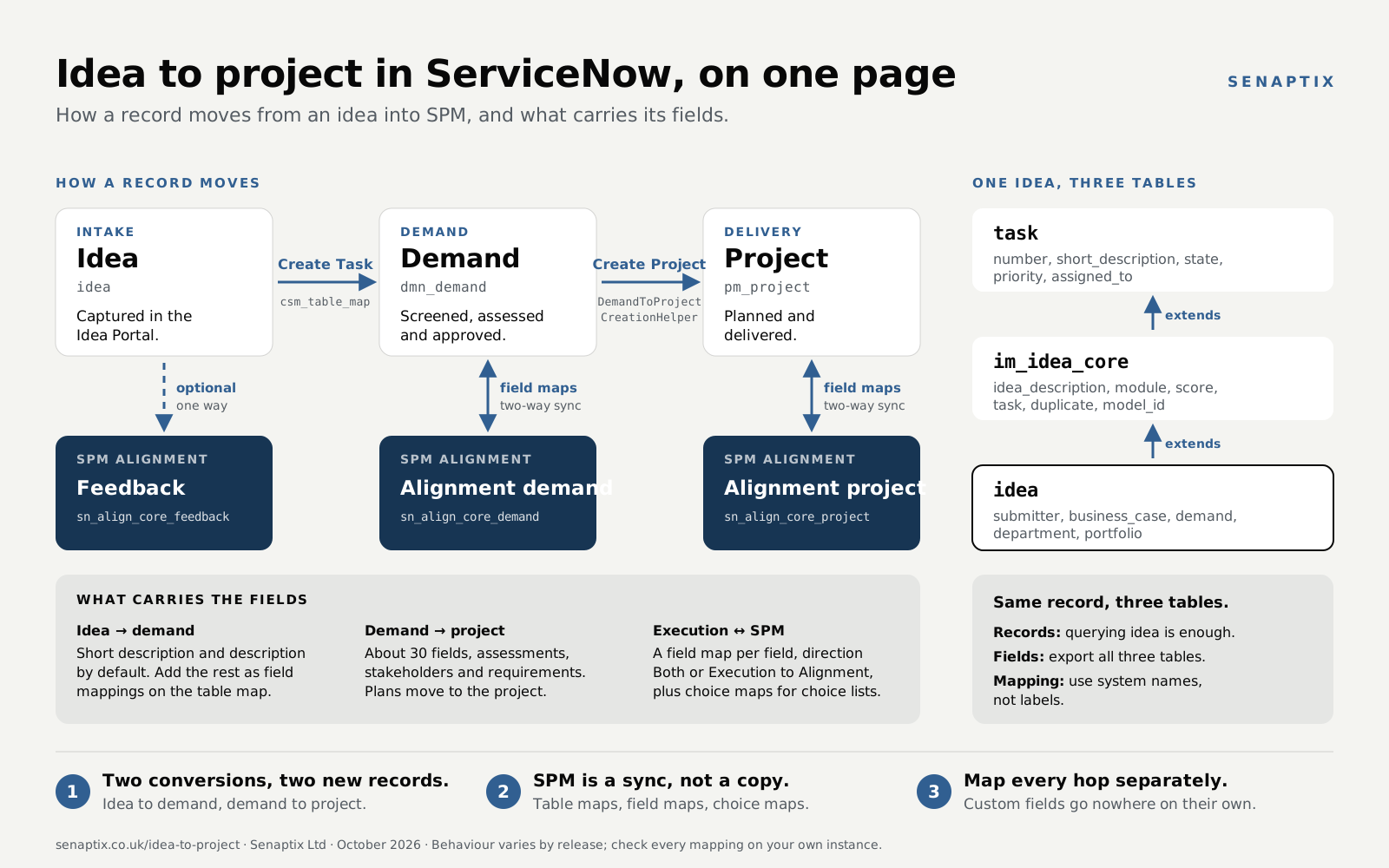
Most work on a CWM or ADO board starts long before the sprint. An idea becomes a demand, the demand becomes a project, and each one syncs into SPM, where the PMO sees it. Fields only travel where a mapping carries them, so a value captured on the idea can disappear before it reaches the portfolio view.
Where LeanIX fits
SAP LeanIX is enterprise architecture: capabilities, business applications, lifecycle and target state. It does not connect to CWM or ADO and plays no part in sprints. It integrates two ways with the ServiceNow CMDB, syncing business applications, IT components and discovered software, and can take its initial load from ServiceNow.2524
The chain runs: teams deliver work in CWM or ADO → against business applications in the CMDB, via CSDM → which LeanIX reads for the architecture view.23 Get CSDM right, or the roll-up is built on sand.
Who owns what
| Data | System of record | Why |
|---|---|---|
| Business capabilities | LeanIX | Strategic design data. |
| Business applications | LeanIX or ServiceNow. Decide. | Both can hold it. Two masters means double maintenance. |
| Application services, service instances | CMDB | Operational; used by incident and change. |
| IT components, discovered software | CMDB (Discovery / SAM) | Discovered, not designed. |
| Demands, epics, stories | SPM / CWM / ADO | Delivery data. LeanIX doesn’t need it. |
The common pattern is to design capabilities and applications in LeanIX and keep operational CIs in the CMDB.2827
Live overlap
ServiceNow has renamed APM to Enterprise Architecture and is moving into LeanIX’s space. Decide which system owns the application portfolio before the integration goes live, and write it down.Integration checklist
- Agree the system of record for each object type in the table above.
- Tidy CSDM first. Business applications need owners, lifecycle and relationships to application services.
- Decide the sync direction for each field, and which side wins a conflict.
- Map LeanIX Application fact sheets to
cmdb_ci_business_app, and list any other mapped tables.25 - Run the initial load in a sub-production instance and reconcile duplicates before going live.26
- Make sure every demand and epic in SPM references a business application, so delivery traces to architecture.
Setup guide
A low-risk sequence. Each step is small and reviewable, and none needs heavy customisation. Exact menus vary by release, so follow ServiceNow’s docs for yours.5
Phase 1 · Decide
- Place each team. Apply the decision rule. List teams under CWM, ADO or “not agile yet”.
- Check licensing: your SPM tier (Standard or Pro, and whether EAP is in scope), Performance Analytics entitlement and CWM version.22
- Agree the Definition of Done with development and business stakeholders, including whether it needs UAT. Define Dev Done, Accepted and Deployed. It’s a wording change with no platform risk.
Phase 2 · Configure CWM for platform teams
- One space per team. Add members and link the team’s assignment group.
- Connected Work filters. Bring in the team’s existing stories and epics, e.g. by assignment group and product.1
- Board columns that show all three axes:BacklogReadyIn progressPeer reviewDev Done ★In UATReady to deployDeployedMap the columns onto story states. Check which state your instance counts as “points completed”. If it can be aligned to Dev Done, do that. If not, report on transitions (option B or C).
- Sprint cadence. Two weeks is the usual default. Create sprints in the Sprint Planning view and set capacity from availability.5
- Reserve 20–30% of capacity for unplanned work on platform teams, and log interrupts as visible items.
- Keep the update-set naming convention and story ↔ change links. Tell developers explicitly that deployment doesn’t change.
- Remove any rule that stops a story closing until its change is implemented.
- Close every sprint on schedule. Move unfinished work to the backlog, and keep UAT-only stories in the UAT queue view.34
Phase 3 · Connect ADO for code teams
- Configure the Agile Development ↔ ADO integration. Map ADO projects and area paths to ServiceNow teams.19
- ADO is the master for execution fields. Don’t edit synced stories in ServiceNow.
- Give every epic a parent in SPM. Link each synced epic to its demand or programme so it rolls up.
- Test sprint sync, and accept the gap if it fails. The PMO needs epic and story progress. Sprint burndown stays in ADO.18
Phase 4 · Report and connect
- Check for CWM Advanced 2.2.1 or later. Test what its native velocity counts as complete before building your own.33
- Start capturing history now: sprint membership and state transitions, on the CWM tables, not the classic story fields.
- Build UAT ageing and development-vs-accepted first. Add carryover, scope change, say-do and cycle time next.
- Link demands and epics to CSDM business applications.
- Configure the LeanIX ↔ CMDB integration using the checklist in section 13.
- Review carryover and UAT rework in every retrospective.
How to run a sprint
Day 1 · 2 h
Sprint planning
Commit to rolling-average velocity × capacity. Set a sprint goal.
Daily · 15 min
Stand-up
Walk the board right to left. Flag blocked items with a reason and an owner.
Day 5–6 · 1 h
Backlog refinement
PO-led. Split, size and get next sprint’s stories Ready.
Day 9 · 15 min
Flow check
Review UAT ageing. Chase business owners, not developers.
Day 10 · 1 h + 45 min
Review + retro
Complete the sprint: unfinished work goes to the backlog. Report the three numbers separately.
Running alongside on their own cadence: UAT, CAB and release windows. They don’t hold sprint stories open.
Definition of Ready
- Written as a user story with clear acceptance criteria.
- Small enough to reach Dev Done within one sprint, roughly no more than a quarter of the team’s capacity. Anything larger becomes an epic, split into vertical slices, not by sprint.
- Dependencies known, and a business UAT tester named.
- Linked to its epic, and through it to a demand and a business application.
Sprint planning
- Commit to the 3–5 sprint rolling average of velocity, adjusted for leave and the unplanned reserve.1213 Committing 150% guarantees a “failed” sprint on paper.
- Plan only work that needs the team this sprint. Re-estimate unfinished stories. UAT-only stories stay in the UAT queue.
- Keep refinement separate from planning. The PO owns priority and splitting. The team owns the commitment.
During the sprint
- Give every blocked item a reason and an owner. “Awaiting business UAT” is not the same as “awaiting a technical dependency”.
- Once a story reaches Dev Done it counts toward development throughput. Its journey to production continues outside the sprint.
Sprint review report
| Line | Example | Axis |
|---|---|---|
| Committed | 50 pts | Delivery |
| Developed (Dev Done) | 45 pts · say-do 90% | Delivery |
| Accepted this sprint | 32 pts, from this and earlier sprints | Flow |
| Returned from UAT | 1 story | Flow |
| Carried over | 2 stories, 5 pts | Delivery |
| Waiting in UAT | 30 pts · oldest 12 days | Flow |
| Deployed this sprint | 38 pts across 2 changes | Deployment |
| Unplanned work | 22% of capacity | Delivery |
Retrospective
Use carryover to start a conversation about why work didn’t reach Done, not as a number to explain away. Partially done work is waste to understand, not credit.14
Metrics that beat raw velocity
| Metric | What it tells you | Why it matters |
|---|---|---|
| Development throughput | Points reaching Dev Done | 3–5 sprint rolling average. A forecast, never a target.15 |
| Accepted velocity | Original points passing the full Definition of Done | Completed scope. Counted once, never re-counted after rework. |
| UAT in vs out | Stories entering UAT vs leaving it | A growing gap means an acceptance bottleneck. |
| UAT return rate | Stories sent back from UAT | Points to acceptance criteria or testing gaps. |
| Say-do ratio | Delivered ÷ committed | 80–100% is healthy. Consistently over 100% suggests padding; under 70% suggests over-commitment. |
| Carryover | Stories spilling over | Shows over-commitment without penalising throughput. |
| Cycle time | Days from in-progress to Dev Done | Immune to point inflation. The best single health signal. |
| Time in UAT | Wait for business acceptance | Puts delay with the right owner. |
| Unplanned % | Capacity lost to interrupts | Protects platform teams when velocity dips. |
Don’t rank individuals by velocity
Velocity is a team forecast. Make it an individual target and points inflate until they mean nothing.13 If you need a health signal, use cycle time.Check before you commit
- ADO connector scope on your target release. If the PMO only needs epic and story progress, you’re fine. If it wants ADO sprint burndown inside SPM, that’s a gap.
- The Q4 2026 ADO ↔ EAP date. It has already slipped once. Plan without it.20
- What CWM’s native velocity counts. Check your installed CWM Advanced version and which state it treats as complete.33
- Whether your Definition of Done includes UAT. That decides which number is velocity.
- One team on CWM is a feature, not a failure. Extend CWM to teams whose work is on-platform and who can work in a genuinely agile way. Don’t extend it to code teams.
- The application portfolio’s system of record: LeanIX or ServiceNow EA. Decide before the integration goes live.
References
Checked September 2026. ServiceNow timelines change between releases, so confirm against current documentation and your own instance.
- ServiceNow Community: Team-level agile planning in CWM · Velocity and burndown planned for H2 2026; Connected Work, Sprint Planning, points, capacity; scrum tasks on boards from March 2026.
- ServiceNow Community: OOTB reporting for CWM · Product staff confirm velocity and burndown are not yet OOB; build from Performance Analytics meanwhile.
- ServiceNow: Collaborative Work Management · Product overview.
- DevSquad: ServiceNow Agile Development · Agile 2.0 → CWM deprecation: April 2026 End of Sale, support to 2030. Verify against the official ServiceNow KB.
- ServiceNow Docs: Sprint planning in CWM · The backlog shows all unplanned work items, including older incomplete ones.
- Scrum.org: Dev team velocity vs Scrum team velocity · Points are credited only when a story meets the Definition of Done.
- Scrum.org: Moving Beyond Velocity · Velocity is a complementary practice, not core Scrum.
- GitHub: servicenow-devops-change releases · Pipeline-created changes auto-close with actual start and end times.
- ServiceNow Store: DevOps Change Velocity · Automatic change creation and approval from toolchain data.
- ServiceNow Community: DevOps Change Velocity Quick Start · Traceability, registration and automation as separate phases.
- ServiceNow Community: CWM, concerns about functionality · Practitioners: OOB burn-up and burndown not before Q4 2026; some teams stay on Agile 2.0 for reporting.
- Atlassian: Sprint velocity in Scrum · A 90%-done story is not done; plan from a multi-sprint average.
- TeachingAgile: Sprint velocity guide · Capacity-adjust commitments; velocity is a team metric, never individual.
- Scrum.org: 4 misunderstandings about carryover · Partially done work is not credited.
- Scrum.org: Velocity, a way to measure in Scrum · Velocity should never be a target.
- ServiceNow Community: Sprint burndown chart · The PA Content Pack for Agile 2.0 gives burndown today; the CWM equivalent is in development.
- ServiceNow Community: Collaborative Work Management · Practitioners describing stories that span sprints because they are coupled to change.
- ServiceNow Community: Azure DevOps integration with SPM · OOB integration covers epics and stories; Azure bug → defect mapping is out of scope.
- ServiceNow Community: Integration with Azure DevOps · Syncs ADO projects, teams, iterations and work items to Agile Development teams, sprints, epics and stories; sprint import issues reported.
- ServiceNow Community: Integrating EAP with Jira or Azure DevOps · Interim route EAP → Agile Development → ADO; sprints cannot sync. Jira ↔ EAP OOB since December 2025; direct ADO ↔ EAP postponed to Q4 2026.
- ServiceNow Community: CWM & EAP, agile planning at all levels · CWM and EAP share one data model; CWM is included in SPM Standard and Pro.
- ServiceNow Community: SPM Pro vs Standard · EAP replaced SAFe in SPM Pro; check your tier under Subscription Management.
- ServiceNow Community: CSDM’s relationship with APM, DPM and SPM · CSDM as the shared structure across APM, DPM and SPM.
- ServiceNow Store: LeanIX Integration · Store listing for the integration.
- SAP Help: SAP LeanIX ServiceNow integration · Two-way sync of business applications, IT components and discovered software; initial load from ServiceNow.
- SAP Help: ServiceNow integration FAQs · Common setup and mapping questions.
- LeanIX Community: ServiceNow APM module to LeanIX · LeanIX for strategic decisions, ServiceNow for operations; use both, integrated.
- Coffee In Office: Combining CSDM with LeanIX · Capabilities and business applications owned in LeanIX; service instances and IT components in the CMDB.
- Scrum Guide (2020) · Items that can be Done within one Sprint are ready for selection; work not meeting the Definition of Done returns to the backlog.
- Agile Alliance: INVEST · Independent, Negotiable, Valuable, Estimable, Small (to fit an iteration), Testable.
- Humanizing Work: Guide to splitting user stories · Split vertically for value and feedback; splitting by technical layer fails Independent and Valuable.
- ServiceNow Community: How to create a batch update set · Child update sets take a parent; committing the base update set commits the whole batch.
- ServiceNow Community: Start here, Agile 2.0 deprecation and CWM · Sprint velocity, burndown and burnup charts available as of September 2026 in CWM Advanced 2.2.1; EAP already has team-level sprint reporting.
- ServiceNow Docs: Start or complete a sprint in CWM · Complete Sprint, review completed and open items, move incomplete items to the next sprint or the backlog.
- ServiceNow Docs: Agile in CWM · CWM sprint, points and acceptance criteria aren’t written back to the classic story form; don’t use CWM and Agile 2.0 at the same time for the same stories.
- ServiceNow Docs: Managing scrum tasks for stories in CWM · Scrum tasks inherit the parent story’s sprint; percent complete isn’t rolled up to the story.
- ServiceNow Community: How to track the sprint history · September 2026. Story developed in one sprint, validated in the next; reply suggests metric definitions.
- ServiceNow Community: Managing after sprint is complete in CWM · September 2026. CWM sprint is held on sn_cwm_task, not on rm_story.
- ServiceNow Community: Carryover stories and points to next sprint · October 2024. A carryover table defeated by closing stories and recreating them.
- ServiceNow Community: A lean (mean) ServiceNow release process · 2013, by a ServiceNow employee. Staged release process, pull into UAT, cycle time per stage.
- ServiceNow Community: A simple deploy strategy for small teams · 2022, by a ServiceNow employee. One update set per story; names built from project, release, sprint and story.
- ServiceNow Community: Releasing update sets across instances · Update sets tied to stories; only approved stories go into a release.
- ServiceNow Community: Start date / end date functionality in CWM board · July 2026. The same story on two boards creates two sn_cwm_task records with separate dates.
- ServiceNow Community: CWM Brazil updates, September 2026 · Configurable dashboards within each CWM board.
- ServiceNow Docs: Agile Development sprint dashboard · Agile 2.0 sprint burndown, burnup and cumulative flow diagram.
- ServiceNow Community: Migration guide, Agile Development 2.0 to CWM · Sprint Planning view to allocate, Kanban to track; start CWM sprints fresh at cutover.
- ServiceNow Docs: Metric definition support · Field value duration metrics record how long a field held each value.
© 2026 Senaptix Ltd. General guidance, not an implementation recommendation for any particular organisation. ServiceNow, Azure DevOps, Jira and SAP LeanIX are trademarks of their respective owners. Roadmap dates are the vendors’ and may change.